Kritika Singh

ICICI Bank

Designing a bank login around forgetting.

Role
UX Designer at Sparklin Innovation, for ICICI Bank
When
2022, three months
Platforms
Net banking on web and mobile
Worked with
Product, engineering, QA

Starting point

ICICI is India's largest private-sector bank, with 79M+ retail customers. Most of them open net banking only every few months, yet the login assumed they'd remember a User ID, get through one long form in a single go, and never time out. "Forgot User ID" was the biggest onboarding support ticket, and only 60% of people finished verification.

Outcome

A login with two ways in, recovery without leaving the screen, and verification split into steps that save as you go, all built on a new design system shared by web and mobile. Verification completion rose from 60% to 82%, onboarding got 25% faster, and time to first transaction fell 35%.
The form wasn't the problem. The whole flow assumed nothing would go wrong: no forgotten ID, no timeout, no interruption. For people who log in a few times a year, forgetting is the normal case, so I redesigned around recovery.

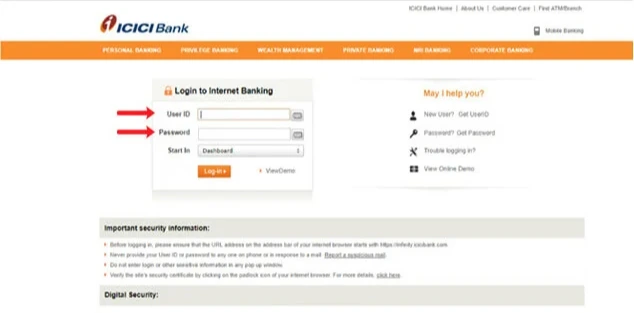
The original ICICI net banking login: a single User ID and password form.
The login I inherited: one way in, and nowhere to go if you'd forgotten your User ID.

From one way in to a way back

I ran 20+ interviews and 7 heuristic reviews across web and mobile, and traced the funnel and support tickets. They pointed at the same moment: someone who can't remember their User ID has no way forward.

Before

  1. Enter User ID
  2. Can't remember it
  3. Call support, or give up

One long verification form. An error or timeout anywhere erased everything.

After

  1. Log in with User ID, or with your registered mobile number
  2. Forgot your ID? Get it right there, using your bank account, debit, credit or travel card
  3. Back in, without a phone call

Verification on separate screens. Each step saves, and you can see how much is left.

Redesigned ICICI login with User ID and Mobile Number tabs given equal weight.
The new login gives User ID and mobile number equal weight. Both go through the same security checks, so neither feels like a lesser way in.

One decision per screen

Interviews named session timeouts as the biggest frustration. Losing everything read as the bank losing track of you. Splitting login into single screens meant an error or timeout only cost one step, and each screen asks for just one thing.

Login panel with User ID and Mobile Number tabs, an empty User ID field and a disabled Proceed button.
1Only the User ID. Proceed stays off until there's something to send.
The User ID filled in and the Proceed button now active.
2Once it's filled, Proceed turns on.
Password step showing the customer's name and photo, a masked User ID with Edit, a Show password toggle, a Go directly to menu and a Securely login button.
3Your name and photo confirm it's your account before you type a password. Choose where to land, then log in.
Net banking dashboard after login: balances, financial health score, loans, recent transactions, credit cards, bills, insurance and investments.
Where you land: the redesigned dashboard, built from the same design system as the login.
Nine screens of the mobile number login: country code and mobile number, ATM PIN, verifying and verified PIN, one-time password, then the dashboard.
The second way in, for anyone without their User ID: mobile number, then ATM PIN, then a one-time password, reaching the same dashboard. Each screen confirms the step before it, so you always know where you are.

A design system underneath it all

Every heuristic review flagged web and mobile behaving differently, at exactly the moment people needed to trust the bank. So I built ICICI's design system from scratch: token architecture, 80+ components and documentation, held to WCAG 2.1 AA and adopted by other engineering teams.

Design system overview: a sidebar of 20+ components and a grid previewing accordion, button, checkbox, contained list, content switcher, data table, date picker, dropdown and form.
The component library behind login, verification and every screen after them, from accordions to tooltips.
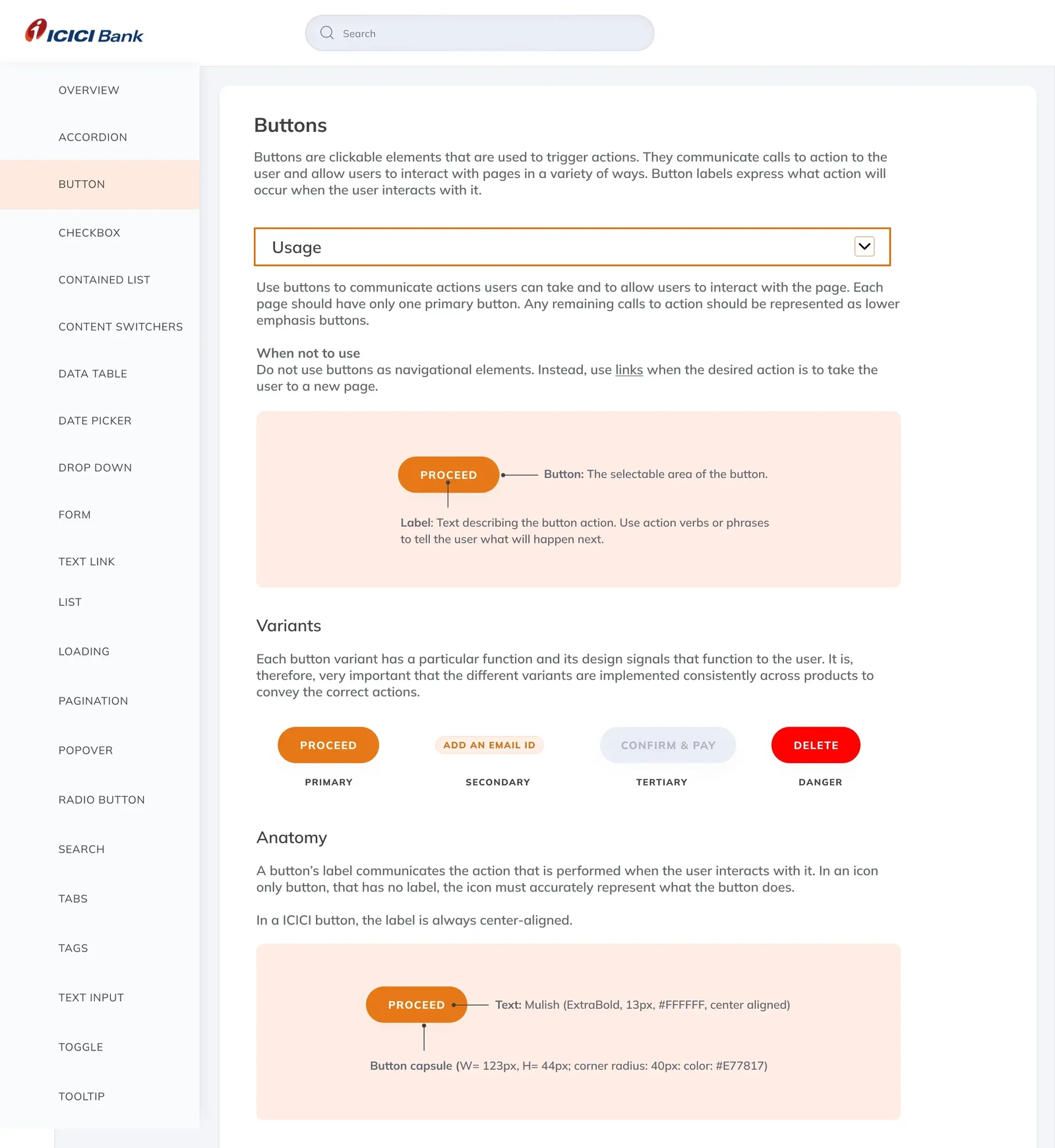
Button documentation: usage, when not to use, primary, secondary, tertiary and danger variants, and anatomy with exact size, radius, colour and type specs.
Every component is documented the same way: when to use it, when not to, its variants and its exact specs. The consistent version is also the easiest one to reuse.

What changed after launch

82%
verification completion, up from 60%
25%
less time to complete onboarding
35%
less time to a first transaction
80+
components in a design system shared by web and mobile